software development with lazylabs
Scoping Requirements
Figuring out what to build is an important part of the process and is deceptively more challenging than initially think.
why? what we want to build can change…and changes all the time
This is because figuring out what to build changes throughout a project. It can change once you learn more, once you built a small piece and interact with your application , it can change because you had more time to think. Engineers know this from product owners and clients as the dreaded scope creep.
It is our job to help you figure out what you want and have a process for handling updating your app you fine tune what you would like to build.
managing scope
Focusing on the right things, and the right level of detail:
- fatmarker sketches vs high fidelity mockups vs figma
- The right level of detail
- less is more
- too much detail on the wrong things leads to missing the things that matter
tools
Use the right tool, for the right job.
meetings
Yes, we consider meetings a tool and like all tools should only be used when appropriate. Initially meetings are good for learning requirements and as inputs for scoping work. Then meetings are usefully for reviewing documented scoped work, live review hard to debug issues. Of course meetings can be used for other things like:
- talking through bugs as soon as they are found
- live review of all issues
- discussing new ideas for features (or changing scope) every time they come up
- too much detail on the wrong things leads to missing the things that matter
The problem with over using meetings is that it 1. interrupts flow which slows down development 2. there are better ways to capture simple issues, write them down!
pen and paper
Yes, pen and paper! We use pen (actually markers) and paper to capture fat marker sketches of key flows of the user behavior. This is done intentionally to focus only on the high level functionality that matters. This is not the stage to worry about “pixel perfect” designs. Pixel perfect designs and high fidelity mockups or what we consider non functional requirements that are better addressed with other tools and a different stage of the process.
figma diagrams
Figma is great for capturing storyboards that show sequence of events of an application. Each step of the sequence can varyfrom high level fat marker sketch to wireframes to high fidelity mockups.
notion
We use Notion to write things down! Notion is great for capturing requirements including fat mark sketches, figma diagrams, and enough of a write up to understand how a feature works.
We use notion to document scope before starting work and to capture feedback once development work has started. This includes documenting simple bug fixes, capture details on hard to debug issues. By writing things down in notion documents, we have something to point to, and we don’t need to have meetings to remember how something works or what we agreed to.
loom
Loom is This is a great tool for capturing brief videos showing how a new feature should work or how existing functionality broken. This can be a good option when its quicker to record a 1-2 minute video instead writing it down or having a meeting
process
here's how we put it all together:
scope requirements
The first stage is to determine the scope of what we are trying to build. What's included? what's not included?
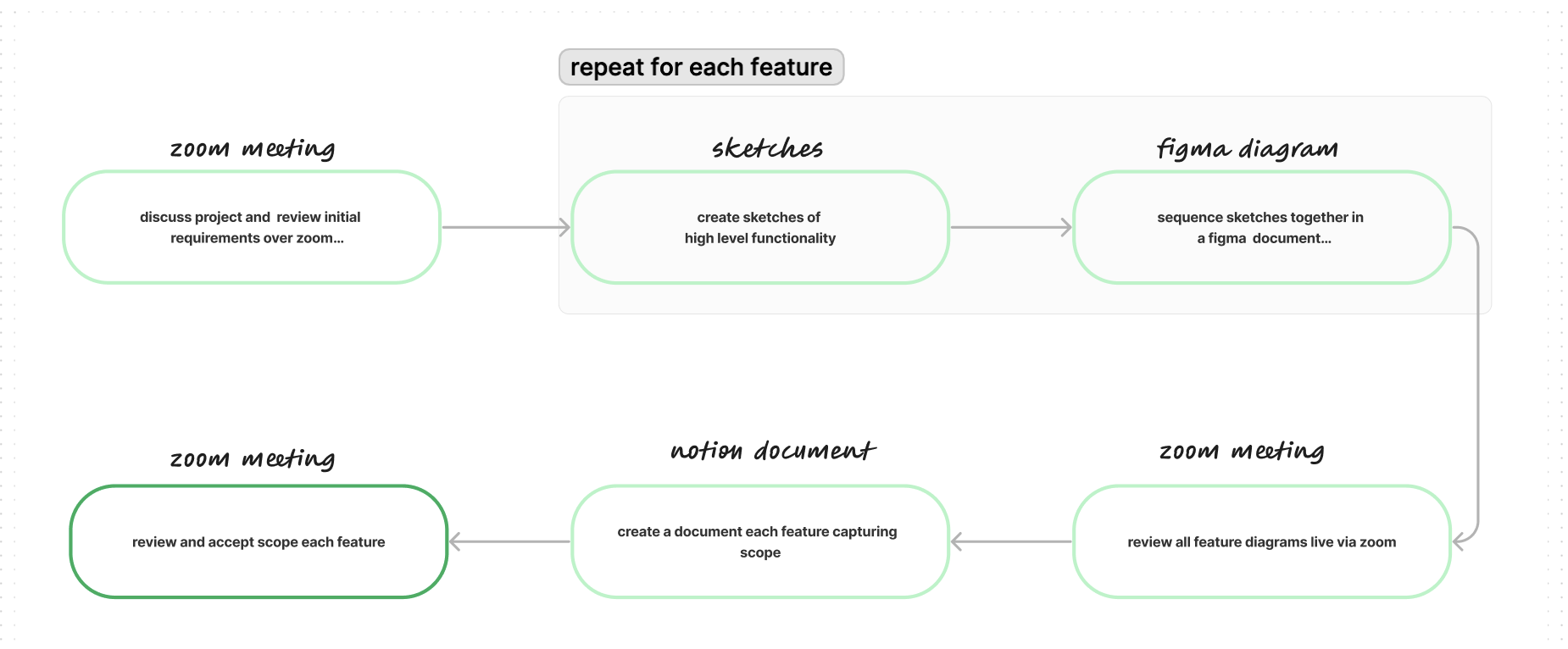
The goal of this stage is to get from conversations about what we want to build to specs detailed enough that any developer can reasonably understand and go off and starting building. If for any reason yu would not like to move forward with lazy labs, then this is also a good breaking point to hand off specs to other developers.
build, test, and deploy
Once we have the work scoped, the next stage is to actually build, test, and iterate!
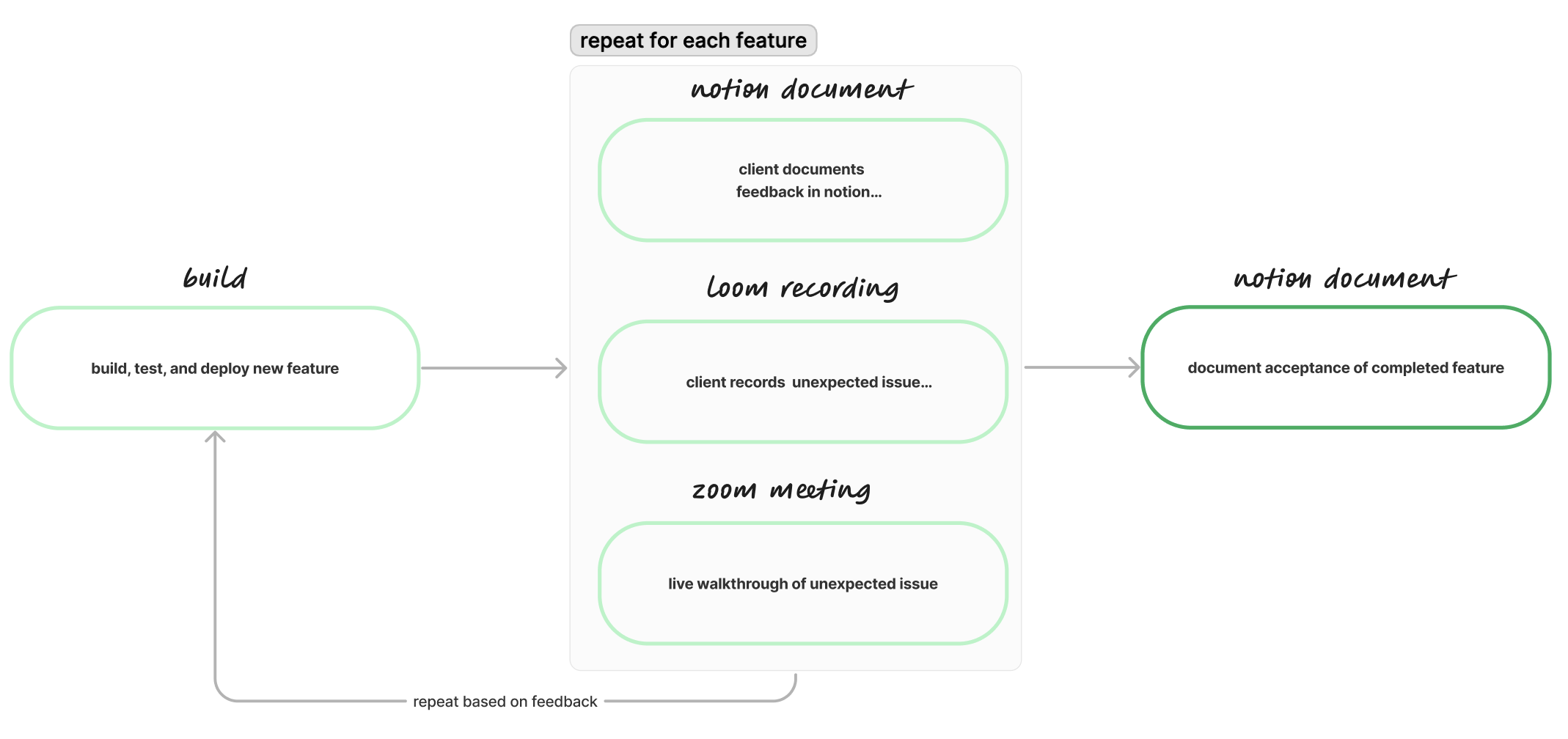
The goal of this stage build your application one piece at a time. Your time and budget is not unlimited, so we cannot afford endless revisions. However, by scoping the work well in the previous stage allows for revisions against the agreed upon scope. By working one piece at a time, we give ourselves the flexibility to determine how to reprioritize scope if changes are needed before the end of the project.